THE PLAYBOOK · DOORSL
Understand the basics of Mahjong Connect
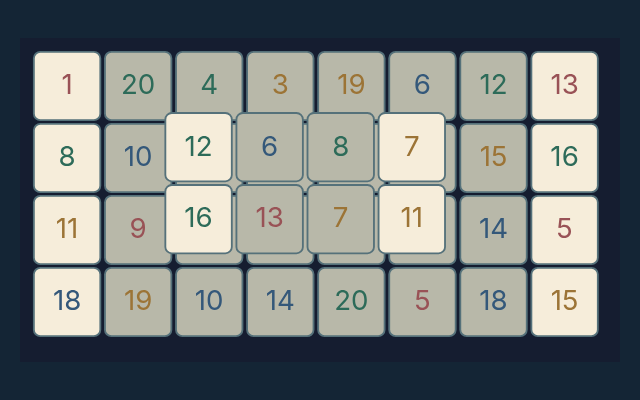
Try Mahjong Connect at your own pace and keep its objective in view. Remove matching tiles connected by a path of at most two turns. Use the example below to understand a decision. Compare the starting position with the example in the Guide. Use the example below to understand a decision.
6×8 grid and two-turn path finding.
Something to practise
Before your first action, say what you are trying to achieve. Then compare the result with the goal. Use the example to check your reasoning.
What counts as success
Remove matching tiles connected by a path of at most two turns. An attractive position is not enough unless the goal is met. Keep the controls in easy reach.
Work through the instructions
- Select equal tiles.
- The route must cross only empty cells.
- An outside-border path is allowed.
- Open connections by removing pairs.
Controls
Tap pairs; use Hint and Undo. On a smaller screen, keep the active part of the board within view. A new-round button replaces the current round.
Work through an example
A same-row pair needs an empty route between its endpoints. Apply the same reasoning to the position in your own round. Keep the controls nearby.
Keep this in mind
Three corners are invalid. Compare the situation with the worked example. Read one step at a time and try it on the playing area. Match the instruction to the control you use.
Questions that come up during play
For this browser game, what is the goal of Mahjong Connect?
For clarity: Remove matching tiles connected by a path of at most two turns.
How do I control Mahjong Connect?
Tap pairs; use Hint and Undo.
As a new player, what example helps explain Mahjong Connect?
Here is the relevant explanation: A same-row pair needs an empty route between its endpoints.
For my first round, what should I watch out for in Mahjong Connect?
Three corners are invalid.
While learning, what format does Mahjong Connect offer?
6×8 grid and two-turn path finding.
When I return, which play mode does Mahjong Connect use?
Here is the relevant explanation: The mode on this page is Solo. Same-device play uses one screen; this game library does not provide internet matchmaking.